How Website Automation Saves Time and Improves Business Efficiency

In today’s fast-moving digital world, businesses need to manage multiple activities simultaneously, from updating website content and responding to customer inquiries to processing orders, monitoring performance, and maintaining security. Performing every task manually can consume valuable time, increase the risk of errors, and slow business growth.
This is where website automation becomes valuable.
Website automation helps businesses automate repetitive online tasks using software, integrations, scheduled processes, and AI-powered tools. From automated customer emails to website backups and lead management, automation can simplify daily operations and help teams focus on more important business activities.
For startups, e-commerce businesses, agencies, and growing companies, website automation is becoming an important part of digital transformation.
In this guide, we will explore what website automation is, how it works, its key benefits, practical use cases, and how the right hosting infrastructure can support an efficient and reliable automated website.
What Is Website Automation?
Website automation is the use of software, scripts, integrations, and automated workflows to perform website-related tasks with minimal manual intervention.
Instead of completing the same activity repeatedly, businesses can configure systems to perform tasks automatically when a specific event occurs or at a scheduled time.
For example, an e-commerce website can automatically send an order confirmation after a customer completes a purchase. A business website can capture a visitor’s contact details and add them to a customer relationship management (CRM) system. A website administrator can schedule content publication or configure automated backups.
Common website automation activities include:
- Automated email notifications
- Contact form submissions and lead collection
- Scheduled blog publishing
- E-commerce order processing
- Customer support chatbots
- Website monitoring and alerts
- Automated backups
- Performance reporting
- Security notifications
- CRM and marketing integrations
The main objective is simple: reduce repetitive manual work while improving consistency, productivity, and operational efficiency.
Why Is Website Automation Important for Businesses?
As a business grows, its digital operations often become more complicated. More customers mean more inquiries, more transactions, more content, and more data to manage.
Without automation, employees may spend hours handling repetitive tasks that could be managed by reliable software workflows.
Website automation helps businesses create more organized processes and reduce unnecessary administrative work.
For example, a digital marketing agency managing multiple clients may automate lead notifications, reporting, appointment reminders, and content scheduling. An online store may automate order confirmations, shipping updates, and inventory alerts.
Automation can help businesses:
- Save time on repetitive activities
- Reduce avoidable human errors
- Respond to customers more consistently
- Improve workflow efficiency
- Manage increasing workloads
- Organize customer information
- Support business growth without adding the same amount of manual work
Automation does not eliminate the need for human oversight. Instead, it allows employees to focus on decision-making, customer relationships, creativity, and other activities that require human judgment.
1. Automate Customer Emails and Notifications
Email automation is one of the most practical ways to improve website efficiency.
Manually sending an email after every inquiry, purchase, or registration can become difficult as customer activity increases.
Automated email workflows can send relevant messages when a customer completes a particular action.
For example:
- A welcome email after account registration
- An inquiry confirmation after a contact form submission
- An order confirmation after a purchase
- A password reset email when requested
- An appointment reminder before a scheduled meeting
- A follow-up email after a service inquiry
These workflows help customers receive timely information without requiring an employee to send every message manually.
Businesses can also use email automation to organize newsletters, onboarding sequences, and customer follow-ups.
However, promotional email automation should follow applicable privacy, consent, and unsubscribe requirements.
Business benefit: Faster communication, fewer repetitive tasks, and a more consistent customer experience.
2. Automate Lead Generation and Customer Management
Generating website traffic is important, but converting visitors into potential customers is equally valuable.
Without an organized process, leads can get lost in inboxes or remain unanswered for too long.
Website automation can connect contact forms, landing pages, CRM platforms, and email systems to create a more efficient lead management process.
Consider this example:
- A visitor fills out a contact form.
- The website validates the submitted information.
- The lead is recorded in a CRM or another approved system.
- The sales team receives a notification.
- The visitor receives an acknowledgment email.
- A follow-up task is assigned to the appropriate team member.
This workflow reduces manual data entry and helps businesses respond to inquiries more consistently.
For service providers, agencies, and B2B companies, this can make lead management significantly more organized.
Businesses should also implement spam protection, secure data handling, and access controls to protect customer information.
Business benefit: Better lead organization, fewer missed inquiries, and a more structured sales process.
3. Schedule Website Content Automatically
Content marketing plays an important role in search engine optimization (SEO), customer education, and brand visibility.
However, regularly publishing articles, updating website pages, and maintaining a content calendar requires planning.
Content scheduling tools allow businesses to prepare content in advance and publish it automatically at specified times.
Many content management systems, including WordPress, support scheduled publishing.
Businesses can use content automation to:
- Schedule blog posts
- Publish planned announcements
- Organize editorial calendars
- Update selected website content
- Send notifications when new content is published
- Coordinate content workflows between team members
For example, a company can prepare four blog posts at the beginning of the month and schedule them for weekly publication.
This makes content production more predictable and reduces the need for last-minute publishing.
Automation should still include human review. Articles need accurate information, useful insights, original content, and appropriate SEO optimization.
Business benefit: More consistent publishing and less manual content management.
4. Improve E-Commerce Operations With Automation
E-commerce websites involve numerous repetitive processes, from order management to customer communication.
As order volumes grow, handling these activities manually can become inefficient.
Automation can connect different parts of an online store and help processes run more smoothly.
Common e-commerce automation examples include:
- Order confirmation emails
- Shipping status notifications
- Low-stock alerts
- Abandoned-cart reminders
- Invoice generation
- Customer review requests
- Return request notifications
- Inventory synchronization
For instance, when a product’s stock falls below a defined threshold, an automated notification can alert the inventory manager.
Similarly, after an order is placed, the store can send a confirmation email and update the order status in its management system.
These workflows help reduce administrative work and improve the customer experience.
However, payment processing, refunds, inventory updates, and order fulfillment should include appropriate validation, error handling, and human review for exceptional cases.
Business benefit: More organized operations, fewer repetitive administrative tasks, and improved order communication.
5. Use AI Chatbots to Support Website Visitors
AI-powered chatbots are increasingly used to help website visitors find information and navigate services.
A chatbot can answer common questions, explain basic service details, direct users to relevant pages, and collect information for follow-up.
For example, a hosting company could use a chatbot to guide visitors toward information about domain registration, hosting plans, SSL certificates, or technical support resources.
Depending on the implementation, chatbots can also:
- Answer frequently asked questions
- Provide basic troubleshooting guidance
- Collect sales inquiries
- Recommend relevant documentation
- Route complex requests to human support
- Operate outside normal business hours
AI chatbots should not be treated as infallible. Their answers need to be monitored, especially when they provide technical guidance or discuss billing and account-specific information.
Businesses should also make it easy for visitors to contact a human when necessary.
Business benefit: Faster access to information and reduced pressure on teams handling repetitive questions.
6. Automate Website Backups and Monitoring
Website performance and availability are important for business continuity.
A website outage, accidental deletion, software update problem, or security incident can disrupt normal operations.
Automation can help businesses detect problems and maintain recovery options.
Automated backups
Scheduled backups can create copies of website files, databases, or other important information.
A useful backup strategy should include appropriate retention periods, secure storage, and regular restoration tests. Keeping every backup on the same server may not provide sufficient protection against server failure or compromise.
Website uptime monitoring
Monitoring services can periodically check whether a website is responding and alert administrators when a problem is detected.
Performance monitoring
Automated checks can help identify slow response times, resource limitations, or other performance issues.
Security notifications
Depending on the tools and configuration, security systems can alert administrators about suspicious activity, failed login attempts, or detected vulnerabilities.
Automation does not guarantee that a website will never experience downtime. Its value lies in helping teams identify problems earlier and respond more consistently.
Business benefit: Better visibility, improved preparedness, and more efficient website maintenance.
7. Connect Website Tools Through Automated Workflows
Many businesses use separate platforms for their websites, email, CRM, marketing, analytics, and project management.
When these tools do not communicate effectively, employees may need to copy information between systems manually.
Integration tools and APIs can connect compatible applications and trigger actions automatically.
For example:
Website form → CRM → Email notification → Follow-up task
Another workflow might look like this:
New blog published → Social media scheduling tool → Team notification
Businesses can use workflow automation platforms, native integrations, or custom API connections depending on their requirements.
Before implementing an integration, check the availability of supported connectors, subscription costs, data permissions, and security requirements.
Not every task needs automation. The best workflows solve a real operational problem without creating unnecessary complexity.
Business benefit: Less duplicate data entry, better coordination, and more connected business processes.
8. How Website Automation Improves Business Efficiency
Website automation can improve business efficiency in several ways.
Saves employee time
Automated workflows reduce the amount of time spent on repetitive activities, allowing employees to concentrate on higher-value work.
Improves consistency
A properly configured workflow follows defined rules each time it runs, helping businesses standardize routine processes.
Reduces manual errors
Automation can reduce errors associated with repeated data entry and manual task execution. It still requires testing and validation to prevent errors from spreading automatically.
Supports faster communication
Automated notifications and confirmations can help customers receive timely updates.
Helps manage business growth
A well-designed workflow can handle increasing activity without requiring every additional task to be completed manually.
Improves operational visibility
Logs, reports, alerts, and workflow dashboards can help teams identify bottlenecks and understand how processes are performing.
The actual benefits depend on the workflow, the quality of the implementation, and how often the automated task is performed.
9. The Role of Web Hosting in Website Automation
Automation requires more than software. It also depends on the website infrastructure that runs applications, processes requests, stores data, and connects with external services.
The right hosting environment can help automated workflows operate reliably.
Web hosting
Suitable for many small business websites, blogs, and standard WordPress installations with modest automation requirements.
VPS hosting
Can offer greater control over server configuration and resources for applications with more demanding workloads or specialized requirements.
Dedicated servers
May be appropriate for resource-intensive applications, larger workloads, or organizations requiring dedicated physical server resources.
The correct option depends on the website, its traffic, the software being used, and the amount of processing required.
Businesses should evaluate the following before choosing hosting for automation:
- CPU and memory requirements
- Storage capacity and performance
- Database performance
- Supported programming languages and software
- Scheduled task or cron job support
- API connectivity
- Security and access controls
- Backup and recovery options
- Monitoring and technical support
- Upgrade and scaling options
For example, a simple scheduled blog post may require very few resources. A workflow that processes large datasets, synchronizes inventory, or runs frequent background jobs may require more careful resource planning.
The key takeaway: Reliable hosting provides a foundation for website automation, but the automation software itself must also be designed and configured correctly.
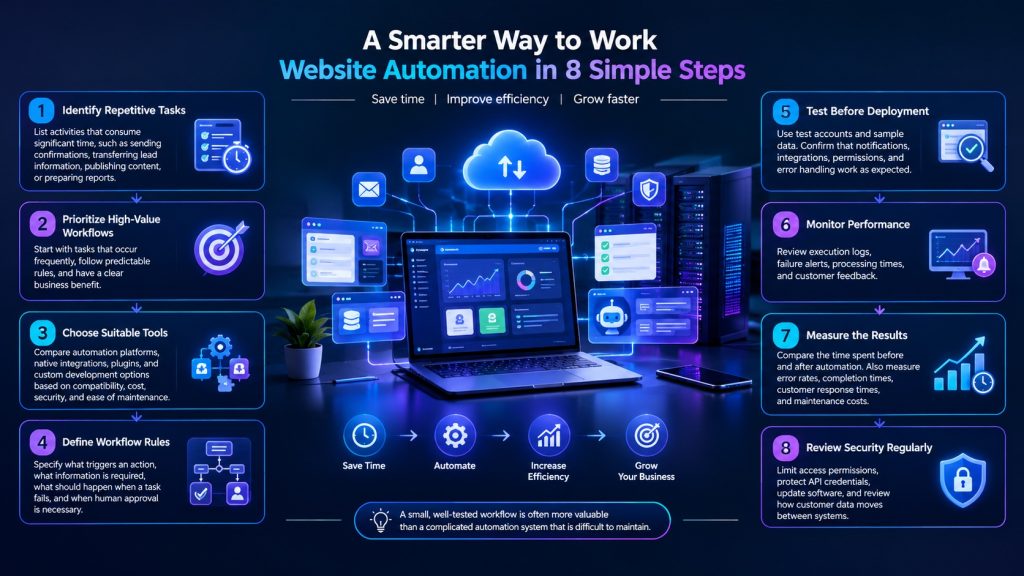
10. Best Practices for Implementing Website Automation
Businesses should start with a clear plan instead of automating every task at once.
Follow these practical steps.
11. Common Website Automation Mistakes to Avoid
Automation can create problems when it is implemented without adequate planning.
Avoid these common mistakes:
- Automating an inefficient process without improving it first
- Choosing tools that do not integrate with existing systems
- Failing to test workflows before launch
- Ignoring error notifications and execution logs
- Giving automation tools unnecessary permissions
- Sending excessive or irrelevant automated emails
- Depending on automation without a backup plan
- Publishing unreviewed AI-generated content
- Failing to monitor costs as usage increases
- Leaving workflows unmaintained after software changes
Automation should make business processes easier to manage, not create another layer of complexity.
Review automated workflows regularly to ensure they remain accurate, secure, useful, and cost-effective.
The Future of Website Automation
Website automation is evolving as AI, cloud computing, APIs, and connected business applications become more accessible.
Businesses are increasingly able to combine traditional rule-based automation with AI-assisted processes.
Rule-based automation is useful when an action follows a predictable condition, such as sending a confirmation after a form submission.
AI-assisted automation may help with tasks such as classifying customer inquiries, summarizing information, or routing support requests based on their content.
However, AI-generated results may be inaccurate, and sensitive or high-impact decisions often require human review.
Cloud infrastructure can also help businesses run applications and background workloads, while monitoring and integration tools provide greater visibility into digital operations.
The future is not about automating every human activity. It is about combining technology with human expertise to make business processes more efficient.
Companies that approach automation strategically can build more consistent workflows and create a stronger foundation for digital growth.
How Parallax Hosting Can Support Your Digital Business
At Parallax Hosting, we understand that a successful online business needs more than an attractive website. It also needs a reliable foundation for performance, security, and growth.
Whether you manage a company website, publish a blog, operate an online store, or develop a resource-intensive application, choosing suitable hosting is an important part of your digital strategy.
Parallax Hosting offers services including:
- Web Hosting
- VPS Hosting
- Dedicated Server Hosting
- Reseller Hosting
- Domain Registration
- Business Email
- SSL Certificates
As your website and automated workflows grow, your infrastructure requirements may change. Selecting an appropriate hosting solution and reviewing your resource needs can help you prepare for those changes.
Ready to build a stronger digital foundation for your business?
Explore Parallax Hosting and choose a hosting solution that fits your website, workload, and growth plans.
Conclusion
Website automation is a practical way to reduce repetitive work, improve consistency, and make business operations more efficient.
From automated emails and lead management to content scheduling, e-commerce workflows, website monitoring, and AI chatbots, automation can simplify many everyday digital tasks.
The best results come from choosing the right workflows, testing them carefully, protecting customer data, and measuring their impact.
Just as importantly, automated websites need suitable infrastructure to support their applications, integrations, and processing requirements.
Automate repetitive tasks. Improve your workflows. Focus on business growth.
With the right automation strategy and hosting foundation, your business can spend less time managing routine tasks and more time creating value for customers.
Frequently Asked Questions
What is website automation?
Website automation uses software, scripts, integrations, and scheduled workflows to perform repetitive website-related tasks with minimal manual intervention.
How does website automation save time?
It reduces the need to manually complete recurring tasks such as sending emails, managing leads, publishing content, processing routine orders, and generating reports.
What are examples of website automation?
Examples include automated email notifications, lead capture, scheduled publishing, e-commerce order updates, chatbots, website backups, uptime monitoring, and CRM integrations.
Is website automation suitable for small businesses?
Yes. Small businesses can start with simple workflows such as contact form notifications, appointment reminders, scheduled blog posts, and automated backups.
How does AI help with website automation?
AI can assist with tasks such as classifying customer inquiries, summarizing information, supporting chatbots, and routing requests. AI outputs should be monitored and reviewed when accuracy is important.
Does website automation require special hosting?
Not always. Basic automation may work with standard web hosting. More demanding applications, background processing, or specialized configurations may benefit from VPS or dedicated server hosting, depending on the requirements.
Is website automation secure?
It can be secure when implemented correctly. Businesses should use appropriate permissions, protect credentials, maintain software updates, monitor activity, and follow applicable data protection requirements.
How can I measure the success of website automation?
Measure time saved, task completion rates, error rates, response times, operating costs, and customer satisfaction. Compare these metrics with the results before automation was introduced.